How it works
To detect vulnerabilities, Wazuh agents collect a list of installed applications from monitored endpoints and send it periodically to the Wazuh server. Local SQLite databases in the Wazuh server store this list. Within the Wazuh server, the Vulnerability Detection module correlates the software inventory data with vulnerability content documents to detect vulnerable software on the monitored endpoint. These documents are Common Vulnerabilities and Exposures (CVE) records that are available in our Cyber Threat Intelligence (CTI) platform.
On the CTI platform, we aggregate vulnerability data from diverse sources like operating system vendors and vulnerability databases, consolidating it into a unified, reliable repository. The process involves standardizing the varied formats into a common structure using the CVE JSON 5 format.
We maintain the integrity of our vulnerability data by doing the following additional tasks.
Rectifying format inconsistencies like version errors and typos.
Completing missing information.
Incorporating new cybersecurity vulnerabilities.
Subsequently, we merge this content, uploading the compiled documents to a cloud server. And finally, we publish these documents to our CTI API.
To update the vulnerabilities information on the Wazuh server, the vulnerability detection module queries the CTI API or an offline local repository. It obtains new documents and any resulting difference with old ones. Then the module publishes new content to a channel notifying subscribers.
Subscribers scan the software inventory of the endpoints using the latest available vulnerabilities information. The detection process looks for vulnerable packages in the inventory databases. These inventories are unique to each agent.
A package is labeled as vulnerable when its version matches those within the affected range of a CVE. Alerts show the results, and the module stores the findings in a per-agent vulnerability inventory. This inventory contains the current state of every agent and includes vulnerabilities that have been detected and not resolved. Users can query the inventory to check for alerts and vulnerability information.
For Microsoft Windows systems and specific Microsoft products, the Vulnerability Detection module has the hotfixes option in the syscollector settings on the Wazuh agent. Using this option enables the module to detect packages that the user has patched. When the Vulnerability Detection module detects a patch, it uses the information provided by Microsoft to decide if the patch has resolved the CVEs. Then, it removes them from the list of vulnerabilities.
Alert generation
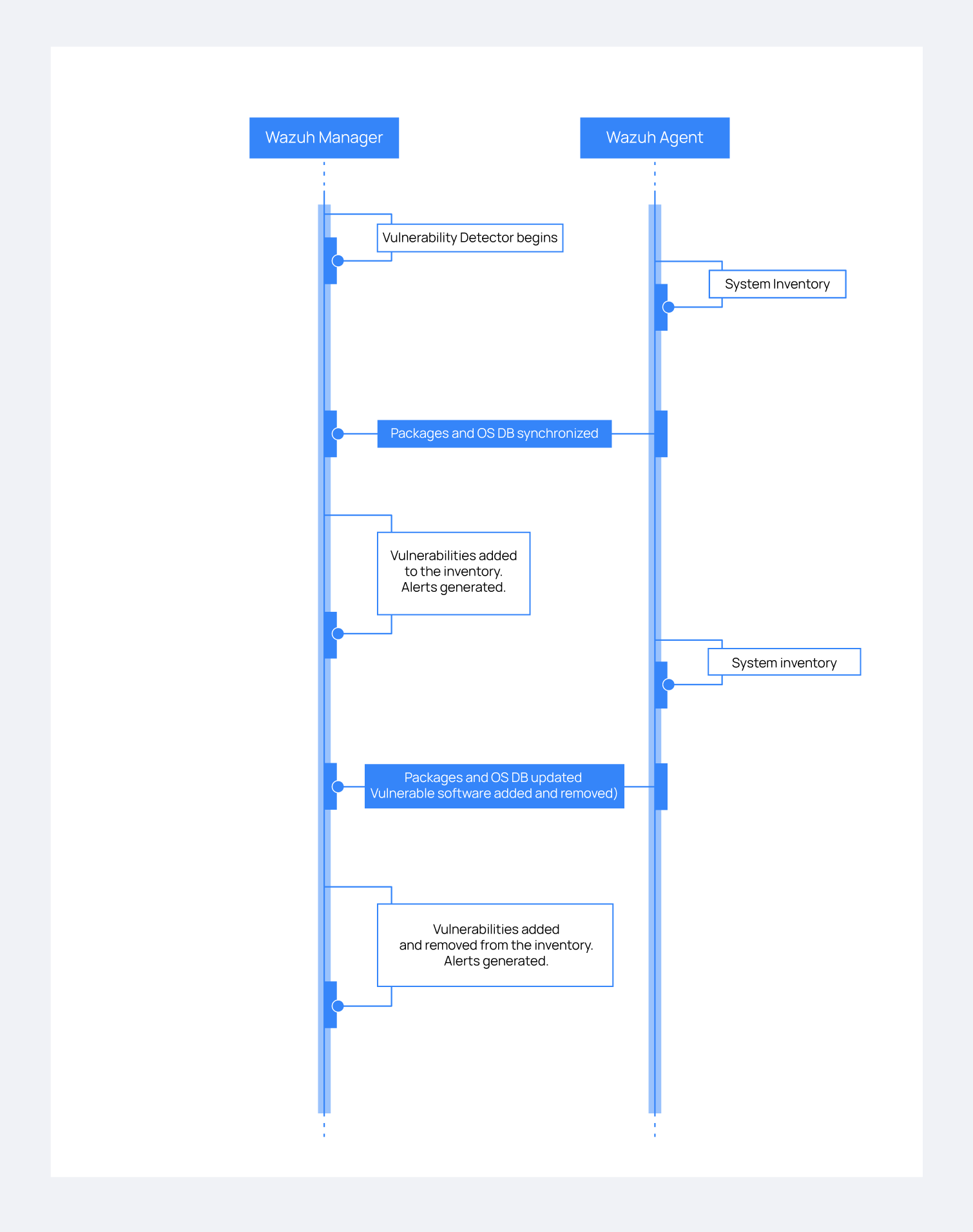
The Vulnerability Detection module generates alerts when it detects new vulnerabilities or when users fix identified vulnerabilities. You can see this workflow in the diagram below.
Compatibility Matrix
We continuously expand our compatibility list to include new operating systems. The following table highlights the operating systems officially supported by the Vulnerability Detection module. While other systems are also supported, we don’t guarantee full detection.
Vulnerability Information Provider |
Operating Systems and Versions |
|---|---|
Canonical |
|
Debian |
|
ALAS |
|
RHEL |
|
AlmaLinux |
|
NVD + MSU |
|
NVD |
|
SUSE |
|
ARCH |
|